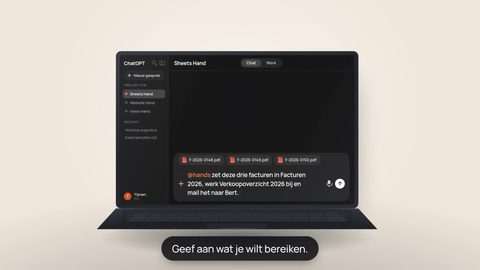
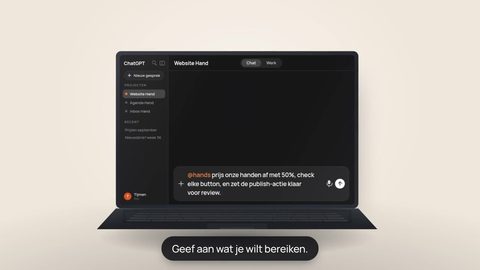
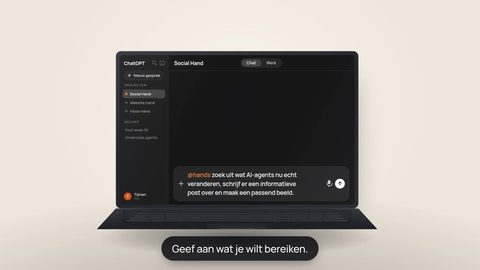
Tell ChatGPT, Claude or any MCP-ready AI what needs to happen. Hands opens the right files,
uses the tools and skills you choose, makes the change and saves the finished work back
where it belongs.
Your first Hand is free for 30 days. Then €5/month; two Hands are €8 and three are €10. Cancel anytime. Free ChatGPT cannot connect a Hand — what you need.
Use the best AI for the job — and let Hands keep hold of the execution.
ChatGPTOrganizes everyday work
ClaudeBuilds and structures
GeminiCreates images and video
PerplexityResearches and substantiates
GrokSignals what is happening now
HandsConnects, preserves, controls and delivers
Provider support varies by plan and interface. Hands only shows capabilities that are actually available.
Where the work breaks
Good AI answers are not the same as finished work.
AI can analyze your spreadsheet, rewrite your document or generate a presentation. But too often the useful result stays trapped inside the conversation.
Hands carries the result through to the file, folder and service where the work belongs.
Eight handoffs become one instruction
Stop moving files. Start giving instructions.
Without Hands
Find the file.
Download it.
Upload it to your AI.
Explain what needs to change.
Download the new version.
Rename it.
Upload it again.
Hope you replaced the right file.
With Hands
“Go to my Monthly Reports folder. Open Revenue.xlsx, add a July tab, calculate actual versus budget, add a chart and save it back to the same file.”
Done.
Same file. Same folder. No manual handoff.
One Hand, whichever brain fits
Choose the best brain. Keep the same execution layer.
Switch providers without rebuilding your work context. One Hand holds the workspace, connectors, skills and approvals; each AI calls into the same controlled setup.
The AI brings its specialty. Hands brings continuity, control and execution.
Same HandChatGPT can call this same Hand
FilesToolsSkillsApprovalsResults
01Its own machineEach Hand runs in a dedicated, isolated Linux sandbox. Your files, tools and workflows are never mixed with anyone else’s.
02Asleep until askedYour Hand hibernates when idle and wakes in about a second when your AI calls it.
03You hold the keyOne access key, yours alone. You decide what it may reach, and important actions stay reviewable.
Connected work
Connect the tools your work already lives in.
Choose only the services your Hand needs. Every connector is authorized separately, can be disconnected again, and is used only when your Hand needs it to carry out your instruction.
Google DriveRead, create and update files. Choose normal access or, when explicitly needed, full-Drive read access.
GmailRead your mailbox and prepare or send email when you instruct your Hand to do so.
Google CalendarRead calendars, check availability and create or change events when requested.
YouTubeRead channel information and upload videos through your connected account.
Google CloudWork with Google Cloud resources using the permissions of your connected account.
GitHubWork with repositories, branches and code so your Hand can investigate, change and test real projects.
NotionRead and update connected pages and workspaces, keeping project knowledge close to execution.
These are the connectors currently available in Hands. More are being prepared. You can disconnect access at any time and revoke it at the provider as well. Read our privacy statement.
Hands use cases
What do you want to get done?
Do not start with a connector. Start with the outcome. Pick a use case, see which AI and work services fit, and use the master prompt as your starting point.
Image directionCampaign outputs side by sideShow one brief expanding into 1:1, 4:5 and 9:16 visuals, a vertical video and a clean approval/publishing queue.
Brief → campaign
Create a complete social campaign
Let Gemini create the media while Hands retrieves source files, organizes variants and prepares a controlled delivery flow.
Brief→Assets→Variants→Approval→Publish
View the master prompt
Use the campaign brief in Notion and the product photos in Drive. Create three 4:5 campaign visuals and one 9:16 video. Write a native caption for each channel, prepare everything for Instagram, TikTok, LinkedIn and YouTube, and ask for my approval before publishing anything.
Image directionLive trend → contentA real-time trend panel on the left, three rising themes in the middle, then an X thread, LinkedIn post and vertical-video draft.
Trend → campaign
Act on what is happening now
Use Grok for live signals and let Hands turn the strongest insight into controlled content variants.
Signal→Interpret→Content→Drafts
View the master prompt
Analyze what people have said about agentic AI for small businesses on X over the last twelve hours. Identify three fast-growing topics, assess the visual formats that are working, and turn the strongest topic into an X thread, a LinkedIn post and a vertical video. Prepare everything as drafts.
Image directionResearch that leaves the browserSources and citations on the left, a decision memo in the center, then three next actions and an executive email draft.
Research → decision
Turn research into concrete action
Let Perplexity compare and substantiate sources; Hands stores the memo, prepares communication and queues follow-up actions.
Research→Memo→Summary→Actions
View the master prompt
Research the five most important European competitors for our product. Prefer primary sources, compare pricing, distribution, target market and positioning, write a decision memo in Notion, prepare an executive email summary and queue the three recommended next actions.
Image directionIssue → green tests → PRA GitHub issue on the left, code diff in the center, green test results and a pull-request card on the right. No production deploy.
Spec → PR
Have a development issue worked through
Claude investigates and builds; Hands provides repository and tooling access while keeping production behind a separate approval gate.
Issue→Plan→Code→Tests→PR
View the master prompt
Read issue CODE-532 and the relevant architecture documentation in Notion. Implement the change in a separate branch, add tests, open a pull request and prepare technical and non-technical summaries. Do not deploy to production.
Image directionInbox → executable workdayUrgent email groups on the left, draft replies in the center and a calendar/day plan with approval status on the right.
Inbox → done
Start the day with everything organized
ChatGPT organizes the information; Hands keeps replies and scheduling as drafts until you approve execution.
Inbox→Priorities→Drafts→Day plan
View the master prompt
Use my Hand to review my inbox since yesterday. Tell me what needs action today, draft the replies, check my calendar for conflicts and prepare a day plan. Do not send or schedule anything until I approve the overview.
Image directionSpreadsheet → board-ready reportShow an existing spreadsheet with a new monthly tab and variance chart beside a compact management overview saved back to the same folder.
Data → monthly report
Update your monthly reporting automatically
A provider-independent Hands flow: work in the files you already use, add the new period and return the finished result to the same place.
Source file→New month→Analysis→Chart→Save
View the master prompt
Go to my Monthly Reports folder. Open Revenue.xlsx, add a tab for this month, calculate actual versus budget, highlight the largest variances, add a clear chart and save everything back to the same file. Do not change anything outside this report.
These examples show the intended end-to-end workflow. Provider and connector capabilities vary by plan and are only offered when your setup supports them.
Seven guided steps, once
Set it up once. Then it disappears into the way you work.
See the complete onboarding — from creating your account to the first connection check — in under eighteen seconds.
Actual Hands screens in light and dark mode. No simulated dashboard.
01Account
02Identity
03AI fit
04Goals
05Connectors
06Install
07Test
Questions, answered.
Everything you need to know before creating and connecting your Hand.
What is a Hand, exactly?
A Hand is your own small Linux computer in the cloud, running software that ChatGPT or Claude can talk to. Your AI already knows how to think; a Hand gives it somewhere to actually do things — open a file, run something or prepare a change.
Every Hand has its own machine, connector URL and access key. Nothing is shared between Hands or with anyone else.
What does it cost?
Your first Hand is free for 30 days without a payment card. It does not renew automatically: after the trial, the Hand pauses until you activate the €5 monthly plan. Two Hands cost €8 and three cost €10 per month and start charging after Stripe confirms payment. Upgrading during the trial ends it. Deleting a Hand does not change your selected paid capacity. Stripe shows the final tax-inclusive price before confirmation.
Paid subscriptions and plan changes use Stripe's hosted checkout and customer portal. If Stripe is unavailable, no plan or paid capacity is changed.
Which AI plan do I need?
It depends on which AI you use, and the differences are real.
AI
What you need
ChatGPT
Plus, Pro, Business, Enterprise or Edu on the web. Turn on Developer mode first. Business, Enterprise and Edu workspaces may apply administrator controls. The Free plan is not currently listed as eligible.
Claude
Any plan, including Free. A free account can add one custom connector, so it can connect one Hand; using multiple Hands may require a paid Claude plan.
Perplexity
An Enterprise organization where Custom connectors are enabled. An admin can allow members to add remote connectors or share one with the organization.
On ChatGPT Business and Enterprise, and on Claude Team and Enterprise, an administrator controls this. If the option is missing, only your admin can change that policy.
How does payment work?
No payment method is required for the 30-day one-Hand trial. Hands emails you 7, 3 and 1 days before it expires. At expiry, the Hand pauses without a charge. To continue, or to use two or three Hands, open Stripe from Hands, link a payment method and confirm the paid plan. We receive only the subscription identifiers, status and payment events needed to run that plan.
What happens when the trial ends, or when I cancel?
The free trial expires by itself, so there is nothing to cancel and no automatic charge. At the end of day 30, the connector URL is blocked and the Hand pauses until payment is confirmed. Cancel a paid plan and access continues through the paid period; part-used months are not refunded. After a failed renewal, Stripe retries during a 7-day grace period before the Hand is paused. Sandbox data is not automatically deleted.
We do not currently delete paused Hands on a fixed timer or create a billing checkpoint automatically. Delete an individual Hand from its dashboard card. Use Account to export your account data or permanently delete the full account.
Where does my data physically live?
Your Hand runs on Sprites, Fly.io's isolated Linux sandboxes. Sprites are placed automatically in the Fly.io region nearest the request; they cannot currently be pinned to a specific country or to the EU.
The sandbox filesystem is backed by Tigris object storage, which Fly.io lists as a sub-processor in the United States. We therefore do not promise that your data stays inside the EU.
Only what is on its own machine, plus whatever you deliberately connect to it. Nothing on your laptop and nothing in your accounts until you connect it yourself.
Why is it asleep when I am not using it?
A Hand hibernates after a short idle period and wakes when your AI calls it, usually within a second or two. You are not paying for a machine that sits and hums.
How do I cancel?
From Account in your console profile menu. Manage subscription opens Stripe's customer portal; there is no form to fill in and no conversation to have first.
You can permanently delete each individual Hand from its dashboard card; that immediately removes its machine, files and checkpoints. Your selected Stripe capacity is managed separately from Account. From there you can download a portable JSON export or permanently delete the full account yourself. Full deletion requires a recent sign-in and your exact email address.
Which AI can I use it with?
Anything that speaks MCP. You add your Hand as a custom connector using its URL and key. The public connecting guide walks through ChatGPT, Claude and Perplexity step by step.
Choose the best AI for the task.Keep the same Hand to finish it.
Create your personal Hand in a few minutes and start getting real work done from the AI you
already use.
Your first Hand is free for 30 days. Then €5/month; two Hands are €8 and three are €10. Cancel anytime. Free ChatGPT cannot connect a Hand — what you need.